
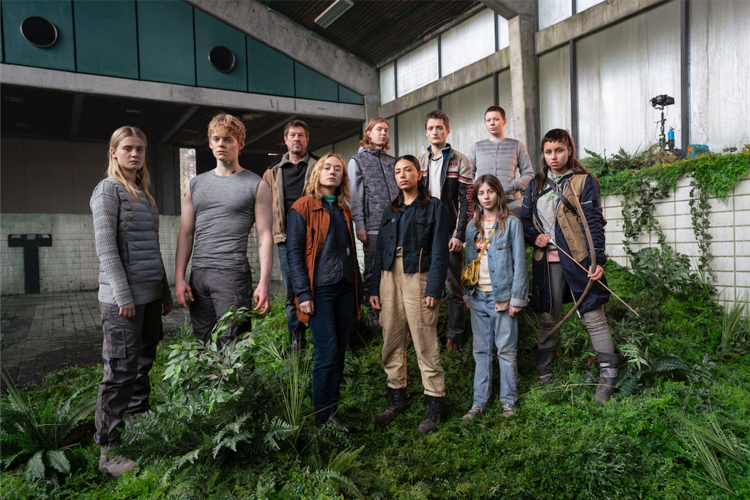
The highly anticipated main trailer for the concluding season of "The Rain" has just been unveiled today by Netflix.
You can catch the trailer right here.
Additionally, a recap of Season 2 is available here, along with a collection of images from the upcoming season.
(Photo credit: Per Arnesen / Netflix)
As the saga unfolds, can the protagonists endure their conflicting beliefs? The series, which has captivated over 30 million viewers globally, returns for its final chapter. "The Rain," a Danish Netflix original, will premiere its last season on August 6, 2020.
Season 3 continues the story from the previous season, depicting the struggle between Simone and Rasmus. In a post-apocalyptic Scandinavia ravaged by rain, Rasmus wishes to spread the virus that granted him superhuman abilities, while Simone is determined to find a cure. The question remains: will they reconcile their differences for the greater good?
The cast includes Alba August as Simone, Lucas Lynggaard Tønnesen as Rasmus, and Mikkel Boe Følsgaard as Martin, alongside other familiar faces. New characters will be introduced, featuring Rex Leonard as Daniel and Cecilia Loffredo as Luna, among others.
Since its debut in 2018, "The Rain" has been a product of Miso Film, created by Christian Potalivo, Jannik Tai Mosholt, and Esben Toft Jacobsen. The final season will consist of six episodes and will be available exclusively on Netflix.
To explore more about "The Rain," visit netflix.com.
About Miso Film:
Established in 2004 by producers Jonas Allen and Peter Bose, Miso Film has produced numerous acclaimed films and television series in Denmark, with collaborations in Norway and Sweden. The company is known for popular titles like "Those Who Kill," "Dicte," and "Acquitted," along with Christoffer Boe's series "Warrior" and "Face to Face." Upcoming projects include Tobias Lindholm’s "The Investigation" and Ole Bornedal’s feature film "Shadows in My Eyes."
About Netflix:
Netflix stands as the leading streaming service worldwide, boasting 183 million paid subscribers across more than 190 countries. It offers a vast array of TV shows, documentaries, and movies in various genres and languages, allowing members to watch content anytime, anywhere, on any device connected to the internet. With no ads or commitments, viewers can play, pause, and resume their favorite shows at their convenience.
What is Netflix Unblocked?
Netflix is a popular streaming service used for watching a diverse range of TV shows and movies on demand. Netflix unblocked describes the practice of circumventing regional restrictions to access content libraries from other countries. This is often done using tools like VPNs to enjoy a broader selection of films and series not available in one's local region.
Why Opt for SafeShell to Access Netflix Unblocked
If you're looking to access region-restricted content on Netflix, you may want to consider SafeShell VPN.
- This VPN provides high-speed servers designed specifically for seamless streaming, ensuring you can watch your favorite shows without interruptions.
- SafeShell VPN employs advanced encryption protocols, protecting your online activities from unwanted surveillance and ensuring your privacy remains intact.
- With its exclusive App Mode, users can unlock content from multiple regions simultaneously, offering a broader selection of entertainment options.
- The platform allows for simultaneous connections on up to five devices, making it easy to enjoy Netflix on various gadgets.
- Additionally, SafeShell offers a flexible free trial plan, giving users the opportunity to explore its features without any commitment.
By choosing SafeShell VPN, you can enhance your Netflix viewing experience while enjoying robust security and unparalleled access to global content.
How to Use SafeShell VPN to Unlock Netflix
To enjoy Netflix content from any region using SafeShell Netflix VPN, follow these straightforward steps:
- Start by subscribing to SafeShell VPN by visiting their official website and selecting a plan that suits your needs.
- Next, download and install the SafeShell VPN application on your device, whether it's Windows, macOS, iOS, or Android.
- Once installed, open the app and log in to your account.
- After logging in, select the APP mode to optimize your Netflix streaming experience.
- Then, choose a VPN server located in the desired region to access specific Netflix libraries.
- Finally, open the Netflix app or website, log in to your account, and indulge in the content available in your selected region.

 English
 Arabic
 Spanish
 Portuguese
 Deutsch
 Turkish
 Dutch
Dutch
 Italiano
 Russian
 Romaian
 Portuguese (Brazil)
 Greek
Greek
Warning: Undefined array key "_is_photo" in /home/senmarri/public_html/friend24.in/content/themes/default/templates_compiled/9ea4999d05077b6b690d81624544cd64a51b1299_0.file.__feeds_post.comments.tpl.php on line 27
Warning: Attempt to read property "value" on null in /home/senmarri/public_html/friend24.in/content/themes/default/templates_compiled/9ea4999d05077b6b690d81624544cd64a51b1299_0.file.__feeds_post.comments.tpl.php on line 27
" style="background-image:url(
Warning: Undefined array key "user_picture" in /home/senmarri/public_html/friend24.in/content/themes/default/templates_compiled/19bd7b5d2fc32801d9316dbc2d8c5b25c99e72c3_0.file.__feeds_comment.form.tpl.php on line 31
);">
/home/senmarri/public_html/friend24.in/content/themes/default/templates_compiled/9ea4999d05077b6b690d81624544cd64a51b1299_0.file.__feeds_post.comments.tpl.php on line 128
Warning: Attempt to read property "value" on null in /home/senmarri/public_html/friend24.in/content/themes/default/templates_compiled/9ea4999d05077b6b690d81624544cd64a51b1299_0.file.__feeds_post.comments.tpl.php on line 128
">